- High-concerned chemical: None
- Electric: No
- Accessories Type: SD/TF Card Adapter
- With USB: yes
- Model Number: XLL-PSXMemCard Gen2-TRABK
- Compatible Sony Model: playstation2,playstation,PS1 classic
- Compatible Brand/Model: Sony
- Brand Name: BitFunx
- Origin: Mainland China
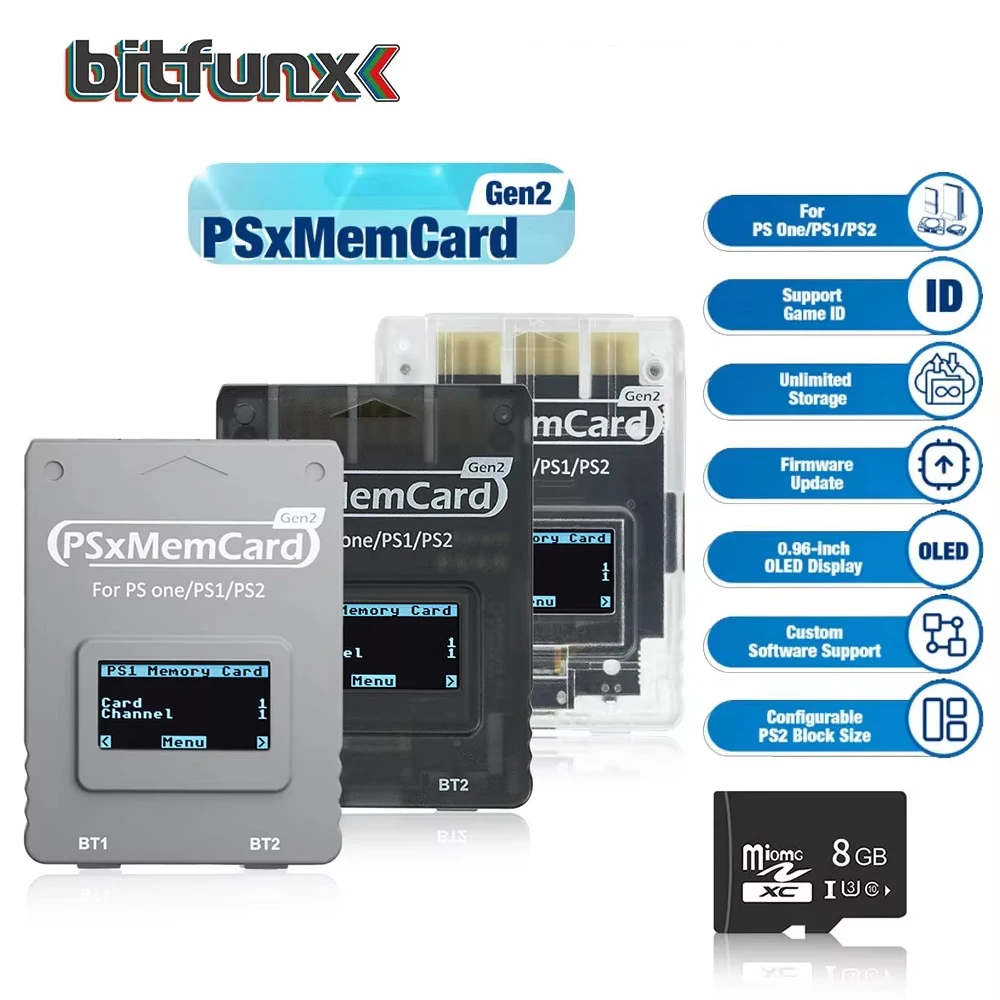
- Feature 1: Supports Micro SD cards from 1GB to 500GB
- Feature 2: Automatically Identify PS1/PS2 Consoles
- Feature 3: Support Save Data Game Card
- Firmware: sd2psx
Purchase Notice:
1. PSXMEMCARD GEN2 can support MMCE, so it can read games directly from the SD card. However, this function is not perfect yet, please use it with caution. We are not responsible for any problems that occur when using this function.
2. If you encounter "error" when updating the firmware, please try updating again.

3. When using, please manually switch PSXMEMCARD GEN2 to the mode corresponding to your game console.
4. If you have any questions about the product, please contact us. Or you can join discord to communicate directly with technical staff.
Bitfunx Discord: https://discord.gg/ewRspdnt3Z
Introductions:
PSxMemCard Gen2 is an optimized version based on the SD2PSXopen-source project, designed to emulate PS1 and PS2 memory cards. This product allows users to store an unlimited number of game saves, fully leveraging modern storage technology and eliminating the limitations of traditional memory card storage capacity.
Based on the open-source project: sd2psx
PSxMemCard Gen2 Format SD Card Reference Video:https://youtu.be/O35oaZDdhAI
For PSxMemcard Gen2--How to format a Micro SD card:https://www.youtube.com/watch?v=O35oaZDdhAI&list=PL6nG-Np8DFrU7KVUFIT0l1HBMWzf7WOUl&index=1
PSxMemCard Gen2 Game Loading Demonstration #MMCEs #MMCEDRV #MMCEMAN:https://www.youtube.com/watch?v=pZEp1lGZRNE&list=PL6nG-Np8DFrU7KVUFIT0l1HBMWzf7WOUl&index=6
PSxMemCard Gen2 Firmware Upgrade Tutorial | Boost Performance & Compatibility:https://www.youtube.com/watch?v=i8QPqcU9OWw&list=PL6nG-Np8DFrU7KVUFIT0l1HBMWzf7WOUl&index=5&t=12s

Features:
Support PS1:
*Create virtual memory cards (128KiB) for PS1 game saves, compatible with both PS1 and PS2.
*Supports launching FreePSXBoot using Unirom or Tonyhax.
Support PS2:
*Create virtual memory cards for PS2 game saves, compatible with PS2, PSX, and arcade PS2s systems.
*Supports launching FreeMCBoot, OpenTuna, and other exploits.
Support Game ID:
*It can automatically detect running games and create dedicated virtual memory cards to help players save game saves and enhance their gaming experience.
Unlimited Storage:
*Supports Micro SD cards from 1GB to 500GB,
*Each 1GB of storage provides enough space for 8192 PS1 memory cards or 128 8MB PS2 memory cards
*Supports setting the size of the PS2 virtual memory card, ranging from 1MB to 64MB.
User-Friendly Display and Controls:
*Equipped with a 128x64 pixel OLED display to show the current system status.
*Navigate the settings menu easily with two front buttons, making operation more convenient.
Convenient Update Functionality:
*Front-facing USB-C port for firmware updates, ensuring the device stays up-to-date.


FAQ
Q1: Does Psxmemcard gen2 comes with FreeMCBoot pre-installed?
A1: The PSxMemCard gen2 comes pre-installed with:
1. FMCB 1.966 for PS2 fat console in BootCart - Channel-1
2. FunTuna RS for PS2 slim console in BootCart - Channel-2
* If the homebrew software cannot be started normally, it is not a product problem. Please install and replace the homebrew software yourself.
Q2: Can load up ROMs from PSxMemCard GEN2?
A2: No,It can't.
Q3: Can It compatible with sd2psXtd firmware?
A3: Yes, It can.
Q4: Can it running games from SD card?
A4: Yes, It can. But you do need to Install the MMCE Beta 2 software first. (Note: This function is not perfect. We are not responsible for any problems that may occur when using this function. Please use it with caution.)
Q5: "error” occurred while updating the firmware.
A5: Solution: Update the firmware again.
Avaliações
Ainda não existem avaliações.